Social
Media is playing a vital role in creating online business reputation for almost
all sorts of businesses. Every one is trying to make an active social media
profile on all popular social media. Among others Facebook and Twitter are considered leading social media platforms. Therefore
Social media marketing managers nowadays face a tough time in keeping all their
social media platforms up to date.
I
have also been facing this problem as I had to keep an eye on all my profiles
on facebook, twitter, LinkedIn etc. For making things simpler to manage I got a
nice solution of how to link facebook account and a twitter account. Using your
personal facebook account you can easily link either your account or any
facebook page that you own or manage to your twitter account.
For
example I have one personal facebook account and within that I have almost for
pages which I manage including the “InternetCoins” page. In this scenario when
I link my profile to twitter account then all my activities on my personal
facebook account will also be done automatically on the linked twitter account.
Isn’t it really nice? Here I can
either link my profile to twitter account or a page which I own like “InternetCoins”
only to twitter account. When I link only a sigle page to twitter, then only
the activities on that facebook page will only be reflected automatically on
twitter account.
Now let’s see how to do it?
1. Login to your personal facebook account.
2. Get your facebook URL after login
3. Here you can see my URL i.e http://www.facebook.com/Imran Aly
4. Click on that URL and start deleting from right until it looks like: http://www.facebook.com/
5. Just type twitter after / as shown in fig and hit Enter Button.
6. You will now see the options to either link your profile to twitter or only a page that you want to link
to twitter as shown in the following figure:
7. Just click the link to twitter button infron of
your profile name if you want to link your profile to twitter or in front of the page that you want to link it to twitter. Here you can see that my page “ InternetCoins ” is already linked to twitter. I will show now how I link GBE to twitter.
8. I am just clicking link to twitter infront of GBE page just to demonstrate:
9. Just click the authorize App and wait for a while, If your twitter account is not signed in it will ask for your twitter handle and password just type it to let the application connect.
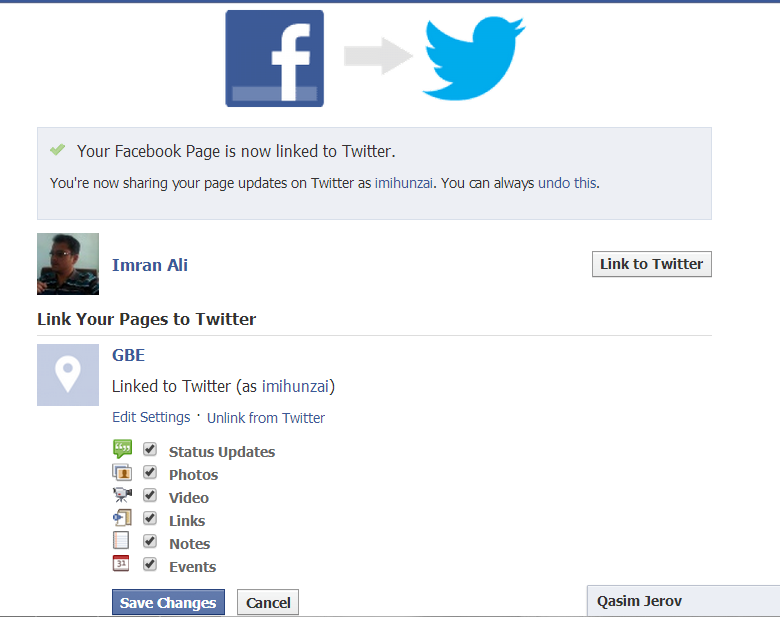
10. Now you will see the following:
The last screenshot shows that I have successfully linked mt GBE facebook page to my twitter account. It also gives us options to select what we want to share on twitter (i.e Staus, Photos, videos etc) Chck the options which you want and click save changes button.
Google Spinner lets you make Big Money in 2014. To try just


 It seems like Telenor, a leading Cellular Company is testing 3G Data service in Gilgit city. I was trying to surf internet using telenor 2G service as usual, I was surprised to notice the unexpected data speed (internet speed) while surfing regular websites. Meanwhile i noticed that the green 3G icon was visible and active on my mobile phone. Then i came to know that it is not a miracle but actually Telenor is testing 3G in Gilgit City. The arrival of 3G service in Gilgit is no doubt a good news for all, but it is extraordinarily special for those individuals who have started or planning to start online jobs (freelancing). In Gilgit-Baltistan there are many skilled professionals who have potential to earn a decent income while working as freelancers or bloggers while working online, therefore this is really a ray of hope for all those who were otherwise suffered due to low internet speed in the region. So, all freelancers, bloggers, SEO/SMM professionals lets hope for the successful launch of 3G service by Telenor and other cellular companies.. Good Luck :-)