Hunza-Pakistan

Learn to earn online!

Here you will find your way to earn through internet.

Hunza-Tech

Hunza-Tech shares the most updated information about how to earn online with its users. This website specifically focuses on Lates SEO / SMM Blogging and content monetization techniques.

Keep on visiting Hunza-Tech.

We constantly update you about the best available and latest Online Earning and Learning resources.

Make your blog / website more income generative!

Here we will be sharing our practical experience of effective SEO Friendly blogging techniques to drive more a traffic.

Hunza-Tech

Well planned Blog / Website with proper marketting returns well. We let you know about the effective blogging and SEO to get more from your blog.

Showing posts with label IT Tips. Show all posts

Monday, December 7, 2015

How to Add Facebook Comment or like plugin


Facebook comment or like plugin is very helpful tool to use social media on your website or blog which is used for online earning or earning from internet. People can like or comment on you site or blog using their Facebook account even they can share your content to their friends or friends of friends.
Step BY Step Procedure
Step 1
Copy the script given below and paste in the body of your website
<div id="fb-root"></div>
<script>(function(d, s, id) {
  var js, fjs = d.getElementsByTagName(s)[0];
  if (d.getElementById(id)) return;
  js = d.createElement(s); js.id = id;
  js.src = "//connect.facebook.net/en_US/sdk.js#xfbml=1&version=v2.5";
  fjs.parentNode.insertBefore(js, fjs);
}(document, 'script', 'facebook-jssdk'));</script>

Step2
Put these lines for your plugin wherever you want the to appear on your website or blog.
<div class="fb-comments" data-href="PASTE YOUR URL HERE” data-numposts="5"></div>

Copy  the link (url)  of a website or blog  you want to use with the comments plugin. And paste in above code inplace of PASTE YOUR URL HERE

Friday, September 19, 2014

Blogging for Android and tablets.

With the revolutionary changes and advancement in ICTs and their application in every walk of life, every day more than ever people are using computers and internet. Initially people have been accessing internet via their desktop computers. Later laptops were frequently used by most internet users, ane now as smart phones and Tablets are very commonly used by majority of internet users. The most common and famous operating system among smart phone and tablet computers is definetly The Android Operating System. So far various versions of Android OS have been released like Jelly Bean and Icream Sandwitch etc.
There are various reasons behind the rapidly growing popularity of Android OS. One of them is user friendliness. Its users become addictive of using it. Moreover it is equally robust and efficient enough to satisfy its users.
Keeping in mind the popularity of Android OS, application developers have been actively involved in developing various Apps for Android. Therefore today we can easily find our required App for our Android Tablet. You may hardly find a task to be done on tablet for which you cannot have an Android App.
I am not wrong in saying that using an Android Tablet or Smart Phone actually makes our life much easier.
As blogging has also become a very famous business on internet and there are bloggers from around the world who are consistently earning a decent income from blogging.  Sometimes bloggers may observe that their blog business is declining.  This may be due to bloggers are not critically noticing the changing demands of internet users and blog visitors, which ultimately suffer them a lot. To get maximum from your blog, you should know the curtent trends. And, Andoid is dominating the market nowqdays, so every blogger must tune his or her blog accordingly. Contemporaty blogs should be responsive, means they should be tuned to fit and displayed well on every display size, whether it be a desktop computer, a laptop, a smart phone or a tablet running Android or any other OS.  This way your blog will be equally common among tablet and smart phone users too.
In the next article i will share some very useful Android Apps you must have installed on your tablet or smart pnone.

Wednesday, March 19, 2014

How to download YouTube, Facebook and Daily Motion videos without download accelerator?

I have seen many people asking in various forums that “how to download youtube videos without installing download accelerator?” or how to download facebook videos without installing download accelerator?” and how to download daily motion videos without installing download accelerator?”.
You really don’t need a specific download accelerator for downloading videos from youtube, facebook or daily motion. Although there are various download accelerators available to download videos from youtube. But the problem is that it may download a youtude video but not one from daily motion or facebook. It is really frustrating!
Here I am going to tell you how to this. I hope you will find it interesting and usefull.
1. Download YouTube Videos.
     a. Go to youtube, search for required video. Just play it there. When it starts playing, copy the URL or             Address from address bar.
     b.Open a new tab in your browser, and open www.keepvid.com
     c. There you will find a text field to paste the address of the required video that you have just copied from youtube. Paste it there  and hit the download button.
    d. After a while you must see the download links of the required video in various formats and qualities. Just click the format or size you need. It will start downloading for you. Isn’t it really simple?
2. Download Facebook Videos.
     a. Browse the required video on facebook. Play it there and copy the URL when it starts playing.
     b.Repeat the above process from b through d.
3. Download DailyMotion Videos.
     a. Browse the required video on dailymotion and click to start playing. Copy the video address from                 address bar.
     b.Open www.savevideo.me in new tab.
     c. Paste the copied URL of required video in the mentioned area. And Hit the Download Button.
     d.After a while you will see the download links of the required video in various formats and qualities. Just         click the format or size you need. It will start downloading for you. Isn’t it too really simple?

From the above steps you might have noticed that the steps are all same but the difference is that when you need to download a video from facebook or youtube you should use www.keepvid.com, and if you have to download a video from dailymotion you need www.savevideo.me. The steps are all pretty simple!

Monday, March 17, 2014

Do you have problem of frequently forgetting your passwords?

Hello guys! Today I am going to share my experiences of dealing with my own passwords. I use to create accounts on many websites for various purposes. You already know that in order to be able to use any online useful data or service you are required to create an account with your email ID, user name for that particular website and a password off course! When you do so for too many websites each for different purpose, one day you may realize that when it comes to check one of you less frequently used account, you have forgot you id or password! It makes us too much frustrate in such situations.
This is what I have suffered from so many times. May be this will be in case of yours too. If it is so then You don’t need to  worry more about this as I have got a solution for you.
The solution is pretty simple; if you are using google chrome, just search for “LastPass” Extension for Chrome. Follow the steps given below to add Last Pass Extension:

In Chrome, go to tools Menu.
Click on Extensions
Scroll down the page and find “Get More Extensions” and click on that. You will find the interface  to search required Extensions.
Write LastPass and search.
 Just click on the “+” in front of LastPass Extesion. It will ask you to download and after a while you     will see it added on your chrome.
Once you have Last Pass installed, you need to create an account on LastPass using your email ID.     
Set a password for that account. After having last pass installed and having account on that. You just need to remember your last pass account and password.
Having your last pass active, whenever you will create an account on any website it will ask to             remember it for you. And you may allow it. Actually it will store all saved accounts information in vault. You can access your vault whenever you need it.

Sunday, March 2, 2014

Linking Facebook page or profile to Twitter account - SMM


Social Media is playing a vital role in creating online business reputation for almost all sorts of businesses. Every one is trying to make an active social media profile on all popular social media. Among others Facebook and Twitter are considered leading social media platforms. Therefore Social media marketing managers nowadays face a tough time in keeping all their social media platforms up to date.   
I have also been facing this problem as I had to keep an eye on all my profiles on facebook, twitter, LinkedIn etc. For making things simpler to manage I got a nice solution of how to link facebook account and a twitter account. Using your personal facebook account you can easily link either your account or any facebook page that you own or manage to your twitter account.

For example I have one personal facebook account and within that I have almost for pages which I manage including the “InternetCoins” page. In this scenario when I link my profile to twitter account then all my activities on my personal facebook account will also be done automatically on the linked twitter account. Isn’t it really nice? Here I can either link my profile to twitter account or a page which I own like “InternetCoins” only to twitter account. When I link only a sigle page to twitter, then only the activities on that facebook page will only be reflected automatically on twitter account.


Now let’s see how to do it?


1. Login to your personal facebook account.  

2. Get your facebook URL after login

3. Here you can see my URL i.e                      http://www.facebook.com/Imran Aly

4. Click on that URL and start deleting from right until it looks like: http://www.facebook.com/

5. Just type twitter after / as shown in fig and hit Enter Button. 

6. You will now see the options to either link your profile to twitter or only a page that you want to link
 to twitter as shown in the following figure:

7. Just click the link to twitter button infron of 
your profile name if you want to link your profile to twitter or in front of the page that you want to link it to twitter. Here you can see that my page “ InternetCoins ” is already linked to twitter. I will show now how I link GBE to twitter. 

8. I am just clicking link to twitter infront of GBE page just to demonstrate:

9. Just click the authorize App and wait for a while, If your twitter account is not signed in it will ask for your twitter handle and password just type it to let the application connect.

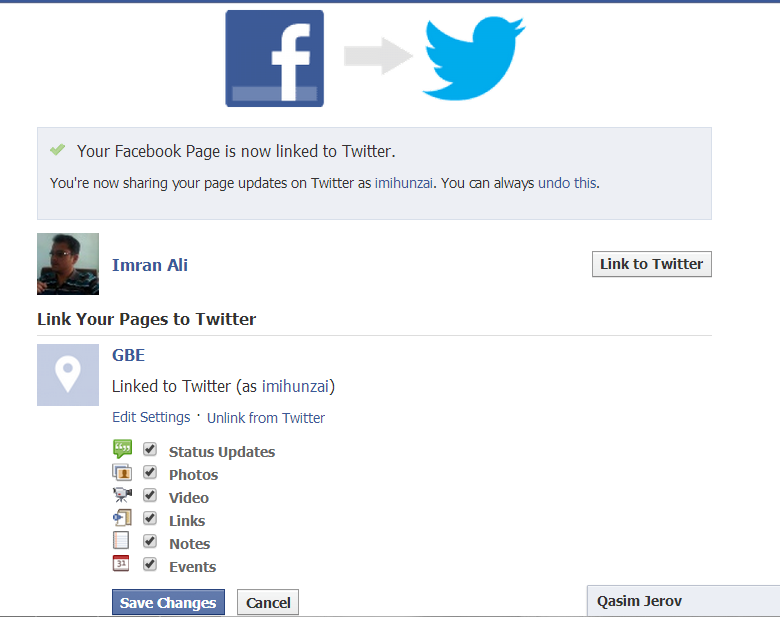
10. Now you will see the following:

The last screenshot shows that I have successfully linked mt GBE facebook page to my twitter account. It also gives us options to select what we want to share on twitter (i.e Staus, Photos, videos etc) Chck the options which you want and click save changes button.

Cheers ! You have done! 

Google Spinner lets you make Big Money in 2014. To try just Click Here!

Saturday, March 1, 2014

Understanding SEO; Most needed and demanded Off-Page SEO Techniques


No one can deny the fact that the area of Search Engine Optimization (SEO) is becoming more interesting with the frequent advancement of technologies. The most dynamic nature of the advent of new technologies makes SEO more challenging! What you learned yesterday in SEO will soon be out of date by tomorrow. So, unless you frequently update your knowledge of SEO, there’s no doubt you’ll be left behind your competitions.
In this article we will try to discuss the well known and recommended 0ff-page SEO techniques. You may find various topics that you are already familiar with, along with many others which would be totally new for you. Learning these all advanced off-page SEO practices will help you to promote your business website, or blog to achieve and maintain high search engine rankings. This article aims to familiarize new SEO practitioner with the contemporary off-page techniques and update the already learnt skills of an intermediate lever SEO expert.
Top off-page SEO Techniques.
It is important to mention here that off-page SEO can only be beneficial for a website or a blog for which on-page SEO has already been done.
So, let’s learn the most demanding off-page SEO techniques to harness the real potential of your business website!

1. Submit to Most Popular Search Engines
The first and most important thing to market your blog/website is to let search engines index your blog  in their listings so that it would be there somewhere SERPs (Search Engine Result Pages). So,submit your site for free on major search engines, like Google, Bing, Yahoo, Alexa, Excite, among others.

2. Social Presence of your Business

Online reputation building is of utmost importance; therefore the first step is to make a social presence of your business. This can be done by becoming member ( for free) of popular social networking sites like Twitter, Facebook, Hi5, MySpace, Linked In, Orkut, etc, and create your own simple profile. These social media sites let s you connect with more and more people online, join groups, participate in active discussions to make a strong and lively social presence.

3. Keep on Blogging
Blogging is also a very usefull toll which you can use for free from various platforms like blogger, wordpress, webs and webbly etc. Blogging is also a best off-page SEO practice to market your business site/blog. Create your business blog and publish helpful, interesting, and unique blog posts regularly. Make the content highly relevant and accurate for your target audience. Spread the word and promote your company’s blog in several free blog directories and search engines.
Alternately, you can also visit different service-related online blogs that let your insert links in comments. Search engines crawls these blog comments and rank your blog higher. If you don’t know how to blog, then hire a guest blogger. Ask him/her to write high quality (useful, relevant, and unique) blog post so that your blog gets more credit from search engines.'

4. Post on Forums
Share ideas, tips, and tricks through your own discussion board (forums). Visit other well-established relevant forum and post a thread, or reply to it. Insert link back to your site/blog in the signature box. Search engine crawlers will index this signature box from these forums (do-follow forums) and rank your website better.

5. Submit to Directories
Although many people think that directory submission is thing of the past, we disagree. In fact, directory submission is still alive and kicking. It purely depends upon how wisely you select directories and categories for directory submission. It may take a while to see results on directories, nonetheless, it is still worth the effort, though.
There are directories offering paid listings, but don’t do that now. Instead, submit your website on free and popular directories like DMOZ, ZoomInfo, Yahoo Directory, Pegasus, One Mission, and so on.

6. Social Bookmarking
Social Bookmarking is another best off-page SEO techniques to promote your company’s site and build online brand. Most people, however, simply don’t know how to use these social bookmarking sites properly, and hence, spam them unknowingly. So, be careful while handling the tags (essential to reach out your news to wide range of audience) and categories. Remember, the better you tag your news, more website traffic (free) you get.
Do social bookmarking on popular sites like StumbleUpon, Delicious, Diggs, Propeller, and so on.

7. Link Exchange
There would be many highly ranked and similar websites / blogs there with which you may exchange your link,  known as thematic link exchange, this is another way to increase the popularity of your link. Exchange links with high PR sites as this is one of the major factors to determine PageRank of your site. Always try to avoid using Black-Hat off-page SEO techniques, though.

8. Link Baiting
When you are referencing other individuals' online journal substance / content on your site/blog, then do not forget to mention their link as reference. Regarding expanding your blog URL prevalence, both ways work: referencing different sites on your posts, and tolerating other individuals' solicitation, as well. 

9. Share Photos and Videos
While using social media for your blog marketing, relevant videos and pictures of your services and products may attract your customers. In this way you may effectively drive more and more traffic towards your sit. You should also encourage the visitors to engage in commenting to make your online presence more attractive.
The more comment the pictures or videos receive, more traffic it will drive towards your site. To  effectively use your hosting storage capacity you may upload your photos and videos on major photo and vidoe sharing sites like Youtube, Vimeo,Picasa, Flickr, Photo Bucket, Picli, and so on.

10. Local Listings 
For high competitive keywords, you cannot afford to go global and usually takes you more time to outrank your competition. Instead, make your site/blog local so that when search engine crawl your page, they’ll easily see it and fetch the content.
This way, you can reach as many local audience as possible and in the shortest possible time too. Submit your site on YellowPages, Google Local, Yahoo Local, Maps, SuperPages to start with.

11. Articles Press, Releases and Classified Adds Submission
Search Engines like Google consider the "Deep Links" more worthy that usual domain linking or linking to your home page in back links. Therefore Article submissions, Press Releases and Classified Add Submissions in relevant categories  give your website deep links . Hence theses submissions help gaining higher page ranks. Although this process is usually slower, still writing your own unique and relevant article and submitting them to sites like Prlog, Go Articles, Ezine, Buzzle, and Now Public, won’t hurt either, especially when they boost the traffic flow to your site.


Thursday, December 5, 2013

Have you lost your USB Data; and you are sure you have saved it there?

I have lost my important data in my USB /Flash drive or Memory Card . . . 

How I will recover my very important data?

Solution:

Hey guys! I have observed this problem with most of people. When you are sure that you have saved your data in your memory card, USB or some removable media and you are unable to access your data; even you cannot see there it at all!
If this is the case with you too.. you are lucky that I have a solution for you. Actually your data is "supper hidden" means that even none of the anti virus software cannot fix this issue. 
Follow the steps to have your precious data back for use :-)
HunzaTech-Hidden data Recovery Tip
  • Insert your USB drive or memory card whatever it is.
  • Go to My Computer and identify its drive letter whether it is C, D or something else.
  • Open command prompt. You can open by typing cmd in RUN and hit ENTER!
  • In my case it is the drive D, so type D: and hit enter to go to that drive.
  • You will go to D prompt i.e D:\>
  • here type: attrib -r -a -s -h  /s  /d 
  • Hit ENTER.
  • It will take some time apparently doing nothing in next line depending on the size of data stored. And will retun to D:\> again, hopfully without an error.
Now.. can you beleive, you will have access to your DATA.. 

Have fun and dont forget to comment.


Tuesday, June 25, 2013

Responsive Web Designing

Learn market oriented technologies for Responsive Web Development.

I have tried to collect some tutorials for those who are interested in web development. Responsive Website development is the need of the time. For this, as professional you need to update your web buiding skills and must learn HTML5 & CSS3:


Download pdf

HTM5 is the latest, the fifth version of the hypertext markup language (HTML). In comparison with the previous version HTML5 gives web developers considerably wider opportunities. Particularly, HTML5 introduces new elements and attributes that allow to make the interaction between websites and search engines easier. It will have a positive influence on promotion of such sites in the search engines.
Besides a number of new elements in HTML5 allows to get rid of the necessity to use outside plug-ins and extensions that used to assist web browsers to display websites correctly. To such elements we refer
May functional facilities of HTML5 are supported now by the latest versions of web browsers. The use of HTML5 allows to make the site pages load faster and to enrich your site with new facilities. If any of HTML5 functions is not supported by the browser, it doesn't harm the site at all, as HTML5 is based on HTML4 and elements which are not supported are simply ignored.
CSS3 allows to make the opportunities of website layout coding considerably wider without using outside technologies. CSS3 allows to develop more attractive design of websites using the minimal required code. The same way as HTML5, CSS3 is only partially supported by modern browsers. However, full support of HTML5 and CSS3 by modern browsers is expected to be realized within the next few years.
What benefits can a website owner reap from HTML5 and CSS3-assisted web development?
The main aim that is pursued during website development is to acquire a modern, attractive, easy-to-use and functional website that will perform its tasks effectively. HTML5 and CSS3-assisted web development helps to achieve this aim.
HTML5 and CSS3 allow to cease using a lot of images that form some elements of page design such as rounded corners, shades, gradients. As a result web pages load much quicker. It helps the site to make a positive impression on its visitors.
HTML5 and CSS3 also help to avoid installation of additional plug-ins and extensions for browsers that used to be necessary for playback of animation, video and audio files. In contrast to Flash elements, this technologies interact with the search engines more effectively and do not impede promotion of sites in the search engines.