Hunza-Pakistan

Learn to earn online!

Here you will find your way to earn through internet.

Hunza-Tech

Hunza-Tech shares the most updated information about how to earn online with its users. This website specifically focuses on Lates SEO / SMM Blogging and content monetization techniques.

Keep on visiting Hunza-Tech.

We constantly update you about the best available and latest Online Earning and Learning resources.

Make your blog / website more income generative!

Here we will be sharing our practical experience of effective SEO Friendly blogging techniques to drive more a traffic.

Hunza-Tech

Well planned Blog / Website with proper marketting returns well. We let you know about the effective blogging and SEO to get more from your blog.

Thursday, March 2, 2023

Python Learning Series 02- Install python step by Step


Step No. 01:

Downloading the Python Installer

Please follow the following step to download, Install and Configure Python on your Windows Laptop/PC:
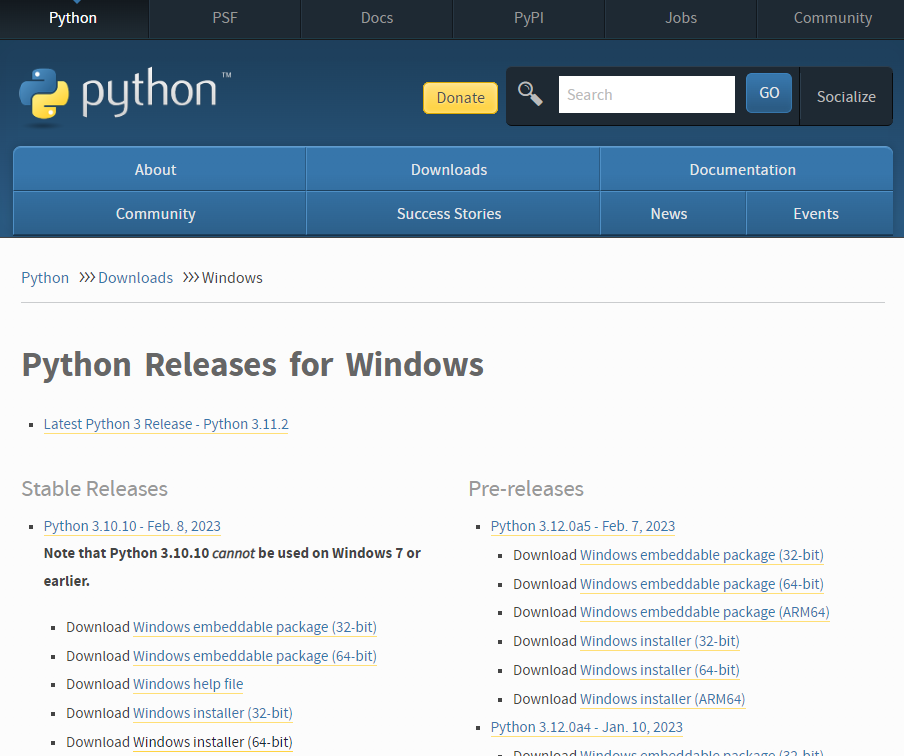
  1. Go to the official Python download page for Windows.

  2. Find a stable Python 3 release. This tutorial was tested with Python version 3.10.10.

  3. Click the appropriate link for your system to download the executable file: Windows installer (64-bit) or Windows installer (32-bit)

  4. Download Python Installer

  5. Step 2 — Running the Executable Installer

    1. After the installer is downloaded, double-click the .exe file, for example python-3.10.10-amd64.exe, to run the Python installer.

    2. Select the Install launcher for all users checkbox, which enables all users of the computer to access the Python launcher application.

    3. Select the Add python.exe to PATH checkbox, which enables users to launch Python from the command line.

      Customize Installation

    4. If you’re just getting started with Python and you want to install it with default features as described in the dialog, then click Install Now and go to Step 4 - Verify the Python Installation. To install other optional and advanced features, click Customize installation and continue.

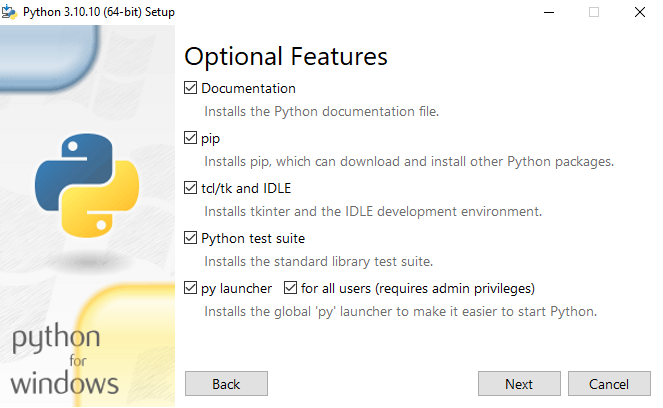
    5. The Optional Features include common tools and resources for Python and you can install all of them, even if you don’t plan to use them.

      Python Optional Features

      Select some or all of the following options:

      • Documentation: recommended
      • pip: recommended if you want to install other Python packages, such as NumPy or pandas
      • tcl/tk and IDLE: recommended if you plan to use IDLE or follow tutorials that use it
      • Python test suite: recommended for testing and learning
      • py launcher and for all users: recommended to enable users to launch Python from the command line
    6. Click Next.

    7. The Advanced Options dialog displays.

      Python Advanced Options

      Select the options that suit your requirements:

      • Install for all users: recommended if you’re not the only user on this computer
      • Associate files with Python: recommended, because this option associates all the Python file types with the launcher or editor
      • Create shortcuts for installed applications: recommended to enable shortcuts for Python applications
      • Add Python to environment variables: recommended to enable launching Python
      • Precompile standard library: not required, it might down the installation
      • Download debugging symbols and Download debug binaries: recommended only if you plan to create C or C++ extensions

      Make note of the Python installation directory in case you need to reference it later.

    8. Click Install to start the installation.

    9. After the installation is complete, a Setup was successful message displays.

      Python setup was successful

    Step 3 — Adding Python to the Environment Variables (optional)

    Skip this step if you selected Add Python to environment variables during installation.

    If you want to access Python through the command line but you didn’t add Python to your environment variables during installation, then you can still do it manually.

    Before you start, locate the Python installation directory on your system. The following directories are examples of the default directory paths:

    • C:\Program Files\Python310: if you selected Install for all users during installation, then the directory will be system wide
    • C:\Users\Sammy\AppData\Local\Programs\Python\Python310: if you didn’t select Install for all users during installation, then the directory will be in the Windows user path

    Note that the folder name will be different if you installed a different version, but will still start with Python.

    1. Go to Start and enter advanced system settings in the search bar.

    2. Click View advanced system settings.

    3. In the System Properties dialog, click the Advanced tab and then click Environment Variables.

    4. Depending on your installation:

      • If you selected Install for all users during installation, select Path from the list of System Variables and click Edit.
      • If you didn’t select Install for all users during installation, select Path from the list of User Variables and click Edit.
    5. Click New and enter the Python directory path, then click OK until all the dialogs are closed.

    Step 4 — Verify the Python Installation

    You can verify whether the Python installation is successful either through the command line or through the Integrated Development Environment (IDLE) application, if you chose to install it.

    Go to Start and enter cmd in the search bar. Click Command Prompt.

    Enter the following command in the command prompt:

    python --version
    

    An example of the output is:

    Output
    Python 3.10.10

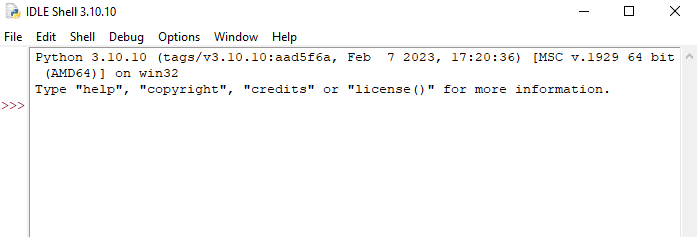
    You can also check the version of Python by opening the IDLE application. Go to Start and enter python in the search bar and then click the IDLE app, for example IDLE (Python 3.10 64-bit).

    Verify if Python is installed using IDLE app

    You can start coding in Python using IDLE or your preferred code editor.

    What we did?

    We have installed Python on our Windows 10 computer and are ready to start learning and programming in Python. Bravo!! We are ready to write our firs Program in Python! 

Python Learning Series 01

Python Learning Series for absolute beginners!

In this learning series, we will quickly have an introduction of most popular programming language,  Python!

What is Python?

Python is a high-level, interpreted programming language that is designed to be easy to read and write. It was first released in 1991 by Guido van Rossum, and since then it has become one of the most popular programming languages in use today.

Why Python is so popular nowadays?

Python is known for its simplicity and ease of use, which makes it an ideal language for beginners. It is also a versatile language that can be used for a wide variety of tasks, from web development and data analysis to machine learning and artificial intelligence.

Python is an interpreted language, which means that code is executed line by line as it is written, rather than compiled into machine code beforehand. This makes it easier to write and test code, and it also makes Python code more portable, since it can be run on any platform that has a Python interpreter installed.

Python is an open-source language, which means that it is free to use, modify, and distribute. It has a large and active community of developers who contribute to its development and provide support to new users. 

So, guys this is a gentle introduction to this amazing programming language. Follow the upcoming posts for more learning. In the next tutorial we will start directly learning learning of how to download and configure python on your Desktop PC / Laptop. 

Next!

Tuesday, February 28, 2023


 Machine learning is a subfield of artificial intelligence that involves developing algorithms and statistical models that enable computer systems to automatically learn from data and improve their performance on a specific task.


In other words, machine learning algorithms enable computers to identify patterns and relationships within a dataset, and use that knowledge to make predictions or decisions about new data. This is done by training the machine learning model on a labeled dataset, where the correct outputs are known, and then using that trained model to make predictions on new, unlabeled data.

There are several types of machine learning, including supervised learning, unsupervised learning, and reinforcement learning. Supervised learning involves training a model on labeled data, while unsupervised learning involves finding patterns in unlabeled data. Reinforcement learning involves training a model through a system of rewards and punishments, in order to optimize its decision-making abilities. Machine learning has numerous applications across a wide range of industries, from healthcare and finance to marketing and entertainment.


Tuesday, August 2, 2022

Learning AngularJS step by step!

Introduction:
AngularJS is a very popular Framework which is written in JavaScript. AngularJS is normally available as a JavaScript file,  whichcan be added to any of your  web page with the following script tag:

<script src="https://ajax.googleapis.com/ajax/libs/angularjs/1.6.9/angular.min.js"></script>

AngularJS extends the functionality of  HTML with  the following ng-directives.

1. ng-app directive:

The ng-app directive defines an AngularJS application.

2. ng-model directive:

The ng-model directive binds the value of HTML controls (input, select, textarea) to application data.

3. ng-bind directive:

The ng-bind directive binds application data to the HTML view.

4. ng-init directive: 

The ng-init directive initializes AngularJS application variables.

5. AngularJS Expressions:

In AngularJS expressions  are written inside double Curly Brackets (Braces)

The following example script illustrates the uses of above mentioned directives and Expressions:

<!DOCTYPE html> //This indicates the start of an HTML file
<html>
<script src="https://ajax.googleapis.com/ajax/libs/angularjs/1.6.9/angular.min.js"></script>
<body>

<div ng-app=""> //Here the ng-app directive is used to indicate that this div will have AngularJS Application code
  <p>My first expression: {{ 88 + 5 }}</p> //Here in this paragraph, the 88+5 expression is inserted with double curly brackets.
</div>

</body>
</html>

Thursday, June 23, 2016

SQL Server - Creating Multiple SQL Server Instances on Single Server

Creating Multiple SQL Server Instances on Single Server

When you install SQL Server, the installation by default creates an instance of SQL Server. But the question is how to create multiple instances?
Once you have installed SQL Server and have the default (or named) instance, start the setup again to create a new instance.
When you run SQL Server 2008 R2 Express setup, the following screen appears:
Installation Screen (First)
SQL Server 2008 R2 Installation Screen
Click “New installation or add features to an existing installation”, from the above window then, the following screen appears:

IN the above screen, you can see that SQLEXPRESS instance already exists on the machine, it was created by the first installation, to install another Instance of SQL server 2008 R2, now select “New installation or add shared features”. Then click Next and accept the License Agreement.
Then select features you want to install for the new instance.
After that the installation lets you specify the name of your new instance (SQLEXPRESS2 was chosen in this example):

Finally, Click Next to create the new instance and perform the remaining setup steps. You need to repeat these steps to create any required number of instances.

Monday, December 28, 2015

Using android applications (apk's) for learning.

Electronic gadgets have become mandatory part of human life. In today's technologically advanced world, we use variety of electronic gadgets ranging from personal computers, specialized electronics for professionals to hand held computers in form of smart phones. Among various electronic gadgets usage of smartphones is increasing unexpectedly.  Almost everyone has his/her personal smartphone. Among most frequently being used smart phones, the most coomon Operating Systems are Apples iOS and Android. When we comparatively see the smartphone usage by OS among these two, in many areas Android users are every where.

Using Smart Phone as "Smart Companion"

Android being an open source platform, is focused by millions of developers around the world. Developers arround the world are designing  variety of Adroid Apps which may be categorized into Entertainment Apps, Show Biz Apps, E-Commerce Apps, Educational Apps, Fortune Teller Apps, News Apps, Educational Apps and many more. This means that we can make our smart phone our smart companion by installing the apps which are really very important and useful not for only entertainment purpose but for personal and professional growth too. Like other professionals there are thousands of Mobile Applications designed for educational purpose, which are supposed to be used by students to help them understand their subjects in more intuitive manner. 
Educational Android apps
All By Myself Android App1. All by Myself. Mercer Mayer's Little Critter book comes to life in this preschool app. The illustrations show that Little Critter doesn't do everything perfectly, but he always makes an effort to do the best he can. Several other Little Critter books are available. 1.99
Monkey Preschool Lunchbox Android App2. Monkey Preschool Lunchbox. Monkey see, monkey do, right? This educational and interactive app offers learning fun with counting, matching, letters and a digital jigsaw puzzle. Kids will love getting animated stickers after completing various games.  $0.99
Star Chart Android app3.Star Chart. For kids who can go out at night, point the phone at the sky and it’ll tell you exactly what you’re looking at. $2.99

Kids Learn to Read Android app4. Kids Learn to ReadThis app invites preschool-aged children to practice blending sounds together to read and spell simple words, such as "dog", "sun", and "big." Children learn to blend letter sounds into words by moving Tommy the Turtle across the letter bridge as each letter is sounded out and a word is formed and pronounced. $3.99
Super WHY Android app5. Super WHY. Give your children the Power to Read with this collection of four “Super WHY” interactive games from PBS Kids. Your child can play along with each of the four main characters from the TV series: Alpha Pig, Princess Presto, Wonder Red, and Super Why, while practicing the alphabet, rhyming, spelling, writing and reading. $2.99
It’s Tyrannosaurus Rex! Android app6. It’s Tyrannosaurus Rex! Soundprints and the Smithsonian Institution recreate a bygone world and give you a glimpse into the life of the Tyrannosaurus Rex. Amazing graphics and powerful sound effects make you feel like the exciting adventures of the prehistoric age are happening right outside your door! This title is carefully reviewed by paleontologists at the Smithsonian Institution and provides fascinating information about the prehistoric world. $2.99
 Toddler Tapping Zoo Android app7. Toddler Tapping Zoo. Designed around lush photographs, this app teaches toddlers to distinguish sounds, associate sounds with images and fine-tune their motor skills. But most of all, they have a great time. $0.99
8. JumpStart Preschool Magic of Learning 2 Android app8. JumpStart Preschool Magic of Learning 2. Designed for little hands and big imaginations! Join Frankie the Dog on a magical learning adventure that will show just how fun learning can be. With seven math, pre-reading, and critical thinking skills for school, this app is the perfect tool to keep your preschooler learning on the go. $.0.99
Madagascar Preschool Surf n’ Slide Android app9.  Madagascar Preschool Surf n’ Slide. In Madagascar Preschool Surf n' Slide, players join young Alex, Marty, Gloria, and Melman, and the entire Madagascar gang for a slip-sliding adventure in learning! Players will surf down amazing slides as they learn multitudes of preschool skills on their mobile device.This app includes 18 lessons across 6 subjects: Numbers, Letters, Colors, Shapes, Animals, and Critical Thinking. $4.99
Kids Socks Android app10.  Kids Socks. Kids match socks by dragging them to their mates. Includes baby mode where toddlers just touch to make a match. Underpants mode also available. Free or $1.49 for Kids Socks Plus.
123s ABCs Handwriting Fun Android App11. 123s ABCs Handwriting Fun. Give young learners a head start in school. Practice the Handwriting Without Tears handwriting print style with ease. Kids practice writing lowercase and uppercase letters, 0-9 numbers and fun shapes. Trace the letter, hear the letter. Shake to erase & try again! This app helps kids with practical exercises that develop writing, reading and fine motor skills. Free. 
Alphabet Car Android app12. Alphabet Car. Learn the alphabet letters, words and spelling in this fun educational app. Use the phone as a steering wheel to drive the bus towards the correct letters and words for a big win! With over 40 levels ranging from easy to hard, this app features 3D graphics and personalized car customization. $2.99.
Math Flash Cards Android app13. Math Flash Cards. This math-tastic app features big buttons for small hands and various levels of difficulty for children in preschool and up. Practice simple addition, subtraction, multiplication and division with traditional cards or test your skills in quiz mode with multiple choice answers. The latest version adds the Math Bonanza game. $0.99  
Dr. Seuss's ABC Android app14. Dr. Seuss's ABC. Learn your ABCs with Dr. Seuss in this app version of the classic children's book! Featuring highlighted words as the story is narrated, this educational app is great for Seuss lovers who are just beginning to learn the alphabet. Check outOceanhouse Media for a variety of other Seuss classic tales available as apps. $3.99
Kids' Flashcards: Fruit & Vegi Android app15. Kids' Flashcards: Fruit & Vegi. Your child will get a kick out of seeing and naming all of their favorite fruits and vegetables in this early learning app. View fruit and veggies pictures and learn how to pronounce and spell their names while following the audio and animation. $1.99
Kids Finger Paint Android app16. Kids Finger Paint. Spin the color wheel to choose a color and get ready to create a masterpiece! This finger painting app features fun, seasonal backgrounds to color and easy prompts for young children to understand. Change the brush sizes by adding pressure to your fingertip and shake the phone to erase your artwork when you're finished! Latest version includes new backgrounds - balloons, butterflies, castles and dragons. Shares pictures with family and friends.  $0.99 
Kids Connect the Dots Android app17. Kids Connect the Dots. Your child will love connecting the dots to see what common object, fruit or animal is revealed! This early learning app features over 90 adorable, dot-connecting cartoons and you can connect the dots by using numbers or alphabet letters. Now optimized for phones and tablets. $2.99; lite version is free.
Kids Alphabet Android app18. Kids Alphabet. Learning the alphabet will be a snap with this educational app! Walking you through the pronunciation and spelling of the alphabet letters, Kids Alphabet features adorable graphics and fun accompanying sounds. Words are written in both print and cursive. $1.49; lite version is free.
Preschool Basics Android app19. Preschool Basics. Strengthen those early motor skills with the Preschool Basics flashcards. Your child can choose from five different flashcard decks, including alphabet letters, numbers, colors, shapes and words -- all in one app! Shuffle the cards for increased difficulty or sit back and listen as the voice explains and pronounces each object. $1.99
CardDroid Math Android app20. CardDroid Math. More in math fun! Kids will love earning gold stars for accomplishing addition, subtraction, multiplication and division problems. This app features large buttons for small hands, a timer for testing your speed, fun narration and various levels of difficulty. $0.99
WordUp! Android app21. WordUp! Similar to the classic game of Boggle, this app is great for children who are learning to spell (and parents who love sneaking in a good word game!). Watch as the letters jumble on the grid and try to find the longest words possible out of connected letters for extra points. $2.99; free for ad-supported version.
Shape Builder Preschool Puzzler Android app22. Shape Builder Preschool Puzzler. Put together the colorful pieces to complete the jigsaw puzzle and see what the mystery shape is! This app includes 144 different puzzles, narration from a professional speech therapist, fun sound effects and cute images. $0.99
Concentration for Kids Android app23. Concentration for Kids. Kids will love testing their memory skills with this classic game of concentration! Packed with three different themes and ten different levels, this app lets you choose from well-known animals, sea creatures and letters for plenty of matching fun. $0.99
Toddler World Android app24. Toddler World. This awesome app features a handful of different educational activities for kids -- including four different flashcard decks, a classical memory game and a painting canvas.  Talk about variety! Kids will love the fun cartoons, silly sounds and the ability to switch between games. $0.99; lite version is free.
Kids Numbers and Math Android app25. Kids Numbers and Math. Strengthen your math skills -- in English, Spanish, French, German, Japanese or Russian -- with these number counting flashcards. Match, subtract and add numbers, or choose from an advanced exercise to test your growing skills! $2.99; lite version is free.
Colors Android app26. Colors. Learn all about primary colors from viewing well-known objects and listening to the voice narration. Parents can customize this colorful app by adding their own object pictures and voice prompts or by starring particular cards for a personalized deck. Plenty of color to go around! Free
Kid Mode: Play + Learn Android app27. Kid Mode: Play + Learn. This award-winning app truly includes it all -- and it's free! With specific game sections for ages 2-8, Kid Mode features coloring books, puzzles and math and word games with popular character such as Dora the Explorer, Thomas the Train, Curious George and many more. Free
Sound Touch Android app28. Sound Touch. Touch the cartoon images of animals, vehicles, birds and well-known objects to find real life photos and sounds for each. With a total of 336 varying sounds and images this app will surely be a lot of fun, all while introducing your tot to common animals and everyday objects. $2.99; lite version is free.
Spelling Bee Android app29. Spelling Bee. See what all of the spelling buzz is about with this fun, educational word app! Spelling Bee includes over 2,300 words and offers various levels of difficulty from easy to hard for beginners and more advanced spellers. $0.99
Toddler Music Jukebox  Android app30. Toddler Music Jukebox. Rock out to twelve fun children's songs, including Wheels on the Bus, Old McDonald, B-I-N-G-O and Itsy, Bitsy Spider. Shuffle capabilities and individual song play are both included. $1.50

Sunday, December 13, 2015

How to Earn from Affiliate Marketing

What is Affiliate Marketing
Affiliate Marketing 
Perhaps the most effective way to elaborate affiliate marketing is that, it is a way of earning from internet/online earning. Whereby you  are salaried for promoting their business i.e product, service or web links.
Affiliate marketing is the process of online earning  in which we advertise or promote any business or any company products or even a web link so that we earn  income online on each sale or single click. “Best advantage of affiliate marketing is that we can earn online without investing any amount”
There are so many types of promotions but in most cases they implicate you as a publisher for publishing  their ads when someone follows a web link that you shared  on your blog to another site for purchasing then you got some sort of commission which you called online earning

.

CYCLE OF AFFILIATE MARKETING

In affiliate marketing there are three major components 

 ADVERTISER

Advertiser

In the affiliate marketing an advertiser can be any organization company, factory or may b an individual who are  selling a product like computer electronics, commercial airline tickets, dress or vehicle spare parts, or an advertiser could be a company which sells policies of different insurances. 


                                                       PUBLISHER

Consumer
PublisherA publisher can be a person  or a company who  promotes an advertiser’s product or service in exchange for earning  some part of sale. Advertisers contractually agree to work with a publisher, then provide the publisher with creative – in the form of web links, images  banner or script advertisements or even unique telephone numbers – that the publisher posts into their website. 


CONSUMER

The last factor that concludes the affiliate relationship triangle is the buyer. The buyer is the one who actually sees the advertisement and then makes an act (either by clicking a web link or by give in to their information through form) that takes them from the publisher’s blog to the advertiser’s to complete the action, which we call a conversion.


 you can earn online from affiliate marketing  in the form of following ways 
  Pay per Sale: In this package a dealer pays you a specific percentage of the sale price when the the     sale is completed through your effort .
  Payper Click: In this package you get paid on the basis of  the number of visitors you visited their      website thorough your link on your blog or website, whether or not a sale is completed.
 Pay per Lead: In this package You get paid once the bring up visitors deliver their interaction    material on the site by filling out a forms.
 Top 10 Best sources to earn from affiliate marketing
 1. LinkShare
 2. Commission Junction
 3. ShareASale
 4. Amazon Associates
 5. Google Affiliate Network
 6. ClixGalore
 7. PeerFly.com
 8. ClickBank
 9. MaxBounty
 10. Neverblue.com